
How to Verify a Coin Flip (Provably Fair Mode)

CoinFlipTool's Provably Fair Mode makes every flip fully transparent. Each flip includes:
- A local device seed
- A public randomness beacon from drand
- A combined string
- A SHA-256 hash
- The result derived from that hash
You can verify each flip directly inside the app using the steps below.
Before You Verify: Make Sure Provably Fair Mode Is Enabled
If you do not see the next to flips on the History page, Provably Fair Mode is not active.
To enable it:
- Tap the Settings icon (gear symbol) in the top-right corner.
- Scroll to the Fairness section.
- Check whether Provably Fair Mode is listed.
- If it appears, the mode is already active.
- If you instead see Default Fair Mode, tap it.
- In the Fairness Configuration menu, select Provably Fair Mode.
- Tap Save.
After enabling, new flips will display the in the History page.
Step 1 — Open the Flip Details
Go to History, then navigate to the tab for the game mode you want to verify (such as "Single Flips", "Best of 3", etc.). Tap the next to the flip you want to verify.
Below is an example showing how fairness details appear:
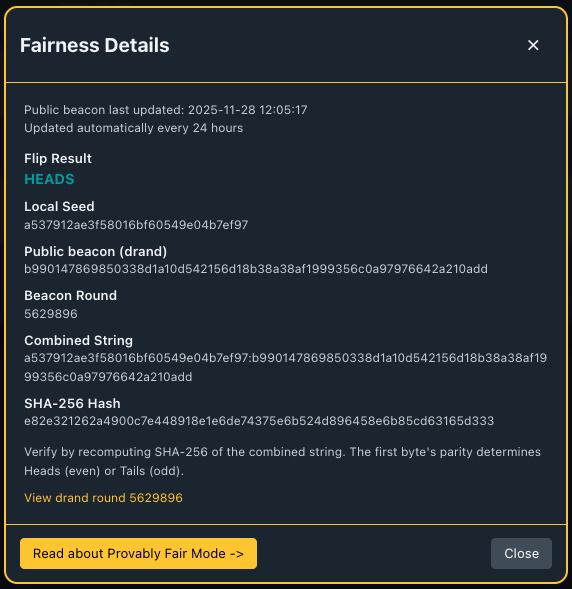
Step 2 — Copy the Combined String
The combined string always uses this format:
local_seed:public_beacon
Copy it exactly as displayed in the fairness details popup.
Step 3 — Compute the SHA-256 Hash
You can recompute the SHA-256 hash using any hashing tool or command-line method.
macOS / Linux
echo -n "COMBINED_STRING_HERE" | shasum -a 256
Windows PowerShell (OpenSSL)
echo -n "COMBINED_STRING_HERE" | openssl dgst -sha256
The resulting hash must match the one shown inside the fairness details.
Step 4 — Determine Heads or Tails from the Hash
CoinFlipTool derives the coin result using the first byte of the SHA-256 hash:
- Even -> Heads
- Odd -> Tails
To verify manually:
- Take the first two hex characters of the hash.
- Convert them to decimal.
- Check whether the number is even or odd.
If it matches the result shown in the app, the flip is verified.
When the Beacon Is Unavailable
If the drand network cannot be reached, CoinFlipTool temporarily switches to Default Fair Mode and displays a notice explaining that the flip used only local randomness.